


Lighting often behaves unpredictably in photography, and even with correct exposure, images can appear too warm, too cool, or slightly off in tone. This happens because cameras interpret light differently from human vision, leading to color inconsistencies that affect realism, mood, and overall image quality across different shooting environments.
The concept of white balance photography helps correct these color shifts so images appear natural and neutral under any lighting condition. It ensures whites stay white and all colors remain accurate, especially in indoor, outdoor, or mixed lighting situations. Now, let’s learn how it works in real shooting and editing workflows.
What Is White Balance in Photography?
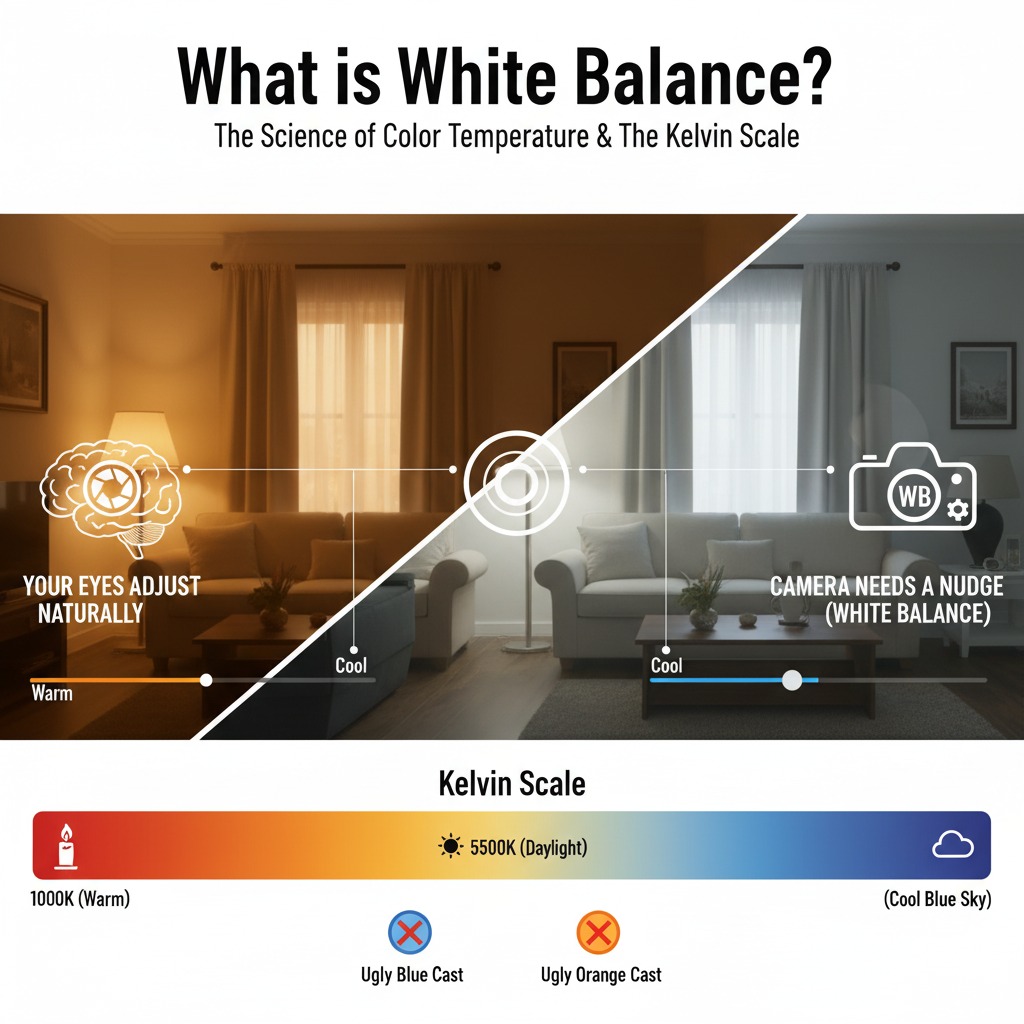
White balance refers to the adjustment of color temperature in an image so that neutral colors appear neutral. In technical terms, what is white balance in photography can be defined as the camera’s process of balancing warm (yellow/orange) and cool (blue) light to produce natural-looking images.
Human vision automatically adapts to lighting changes, but cameras must be manually adjusted or guided to achieve the same result. In white balance in photography, even a small shift can affect the entire mood and realism of an image.
Why White Balance Matters in Real Photography?
White balance is not something you set on your camera. It really changes how true to life your pictures look. When you get it wrong things just do not look right.
For example:
- Skin tones do not look like skin
- White things look yellow or blue or gray of white
- The colors of products are not what they really are
- The whole picture just looks off
That is why getting the colors in your pictures depends a lot on getting the white balance right, especially when you are taking pictures in a studio or for something, like an online store. Getting the white balance right also means you will spend time editing your pictures because they will already look pretty natural.
Common White Balance Problems in Photography
Most photographers notice white balance issues in situations. Let’s go through some common white balance problems.
- Indoor lighting, with bulbs gives a strong yellow or orange tone to pictures.
- On days, shadows tend to have a cool blue tone.
- When there are light sources it can cause uneven color changes.
- Also fluorescent lights often add a tint to images.
These are called color cast issues in photography. If the white balance is not right it can be hard to fix during editing especially if you are working with JPEG files or RAW files.
White balance problems can really affect the quality of your photos. You should always check your white balance settings to avoid these issues. Poor white balance can make a difference in the final image. It is essential to get the white balance right when taking pictures.
Understanding Color Temperature in Photography
Every light source is different when it comes to color temperature. This is measured in Kelvin. Color temperature is basically the base of photography that deals with color.
Kelvin Scale Overview
| Light Source | Kelvin Value | Visual Result |
| Candlelight | 2000K | Strong warm orange |
| Tungsten bulb | 3000K | Warm indoor tone |
| Morning light | 4000K | Slightly warm |
| Daylight | 5500K | Neutral white |
| Cloudy sky | 6500K | Cool tone |
| Shade | 7500K+ | Strong blue |
The scale that measures color temperature is usually called Kelvin balance when people work on photography projects.
Camera White Balance Settings Explained

When you take pictures with a camera the white balance settings can really make a difference. Most modern cameras have built-in white balance settings that help get the colors right based on the lighting.
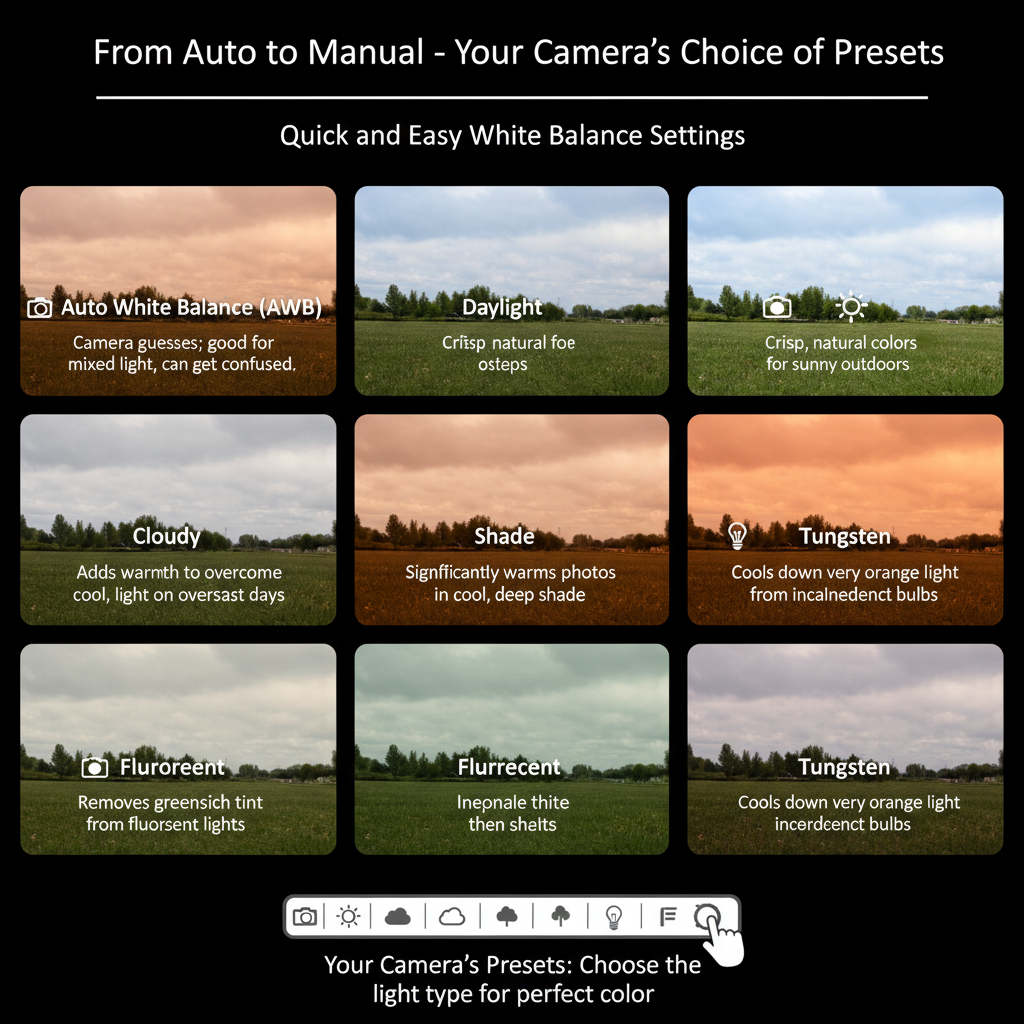
The auto white balance setting is pretty handy. The camera looks at the lighting. Tries to figure out what is going on. This works well when you are taking pictures in places and the light is changing. Sometimes it can be a little off and the colors might not always look the same.
Then there are the Preset Modes. These are like shortcuts for lighting situations. You have:
- Daylight
- Cloudy
- Shade
- Tungsten
- Fluorescent
These modes are already set up for you so you can just pick the one that matches where you are taking the picture.
Custom white balance is the way to go if you want to get it right. The camera uses something, like a gray card to set the white balance. This is what professionals do when they want to make sure their pictures look perfect. They use this method when they are working with white balance settings.
Auto White Balance vs Manual White Balance
Choosing the white balance method can really make a difference in how your photos look. It can make them look consistent and accurate. When it comes to balance you have two main options, auto mode and manual control. Auto mode is quick and easy to use.
Manual control gives you the precision you need for lighting that you control. This is especially important if you want results. The main difference between auto and manual balance is consistency versus flexibility.
Quick Comparison
| Feature | Auto White Balance | Manual White Balance |
| Speed | Very fast | Requires setup time |
| Ease of use | Beginner-friendly | Needs experience |
| Consistency | Can vary between shots | Highly consistent |
| Accuracy | Moderate, depends on camera | High, user-controlled |
| Best for | Casual, everyday photography | Studio, product, ecommerce shoots |
| Lighting changes | Adjusts automatically | Must be reset manually |
Auto white balance is helpful when the lighting keeps changing.It can change the tones between shots. Manual white balance is often preferred in places where you control the lighting. In these situations you need color accuracy to be consistent.
This is especially true for product photography and commercial photography workflows. Manual white balance helps you get the color accuracy that you need. It is useful for controlled environments. White balance is key to getting results.
How to Set White Balance Correctly While Shooting?
When you are shooting you need to set the white balance correctly. This will make things easier, for you later when you are editing your pictures. To do this, you should follow these steps:
- Identify where the light is coming from
- Try not to mix types of light like sunlight and indoor light
- Use a gray card to get a neutral reference point
- Set the balance yourself when you can
- Take your pictures in RAW format so you have options
Using a gray card really helps you get the white balance just right, especially when you are shooting in a studio. You will get better results when you set the white balance correctly while shooting.
White Balance in Product Photography
When you take pictures of products to sell online, getting the white balance right is really important. If it is not quite right it can make a difference in how customers see the products. Some common problems that happen are:
- Backgrounds that look gray or blue
- Clothing colors that do not look right
- Jewelry that does not shine or look
- Cosmetics that look different from what they really are
This is why getting the white balance right is crucial when you take pictures of products to sell online. Getting the lighting right is also very important when you take a lot of pictures of products because all the pictures need to look the same in terms of tone and color and white balance, for product photography is a part of this.
White Balance in Editing (Post-Processing Workflow)
Even with correct shooting, adjustments are often required.
White Balance in Lightroom
Lightroom provides:
- Temperature slider (warm/cool control)
- Tint adjustment (green/magenta balance)
- Eyedropper tool for neutral selection
This is part of white balance in Lightroom workflows used by photographers worldwide.
White Balance in Photoshop
Photoshop tools include:
- Camera Raw filter
- Color Balance adjustments
- Curves for tonal correction
This is commonly referred to as white balance in Photoshop editing.
RAW White Balance Editing
RAW files preserve full sensor data, allowing non-destructive correction of temperature and tint. This makes RAW white balance editing significantly more flexible than JPEG workflows.
White Balance vs Color Correction
White balance and color correction are two things that people get mixed up. They do jobs. White Balance is used to adjust the temperature of the light.
Color Correction in photography is used to make sure the tones are accurate. When we talk about Color Correction we may need to do a things, such as:
- Exposure adjustment
- Contrast balancing
- Saturation control
- Making sure skin tones look right
- Making sure the colors of products are correct
We usually use White Balance and Color Correction together to make the final picture look its best. We need to use both color correction and white balance to make sure our pictures look great.
Common White Balance Mistakes to Avoid
A lot of problems with photos come from mistakes. The White Balance mistakes people make include things like:
- Relying on the auto mode for White Balance
- Mixing White Balance with cool lighting in the same photo
- Ignoring the references for White Balance when taking pictures
- Shooting pictures in JPEG format for White Balance
- Over-correcting the whites in White Balance
- Applying the White Balance settings to every single scene.
These White Balance mistakes often result in color problems in the photos due to White Balance issues.
Best Practices for Perfect White Balance
To get the results you need to do a few things.
- Use the lighting every time.
- You should also shoot in RAW format.
- When you are in a studio, set the balance yourself.
- Try not to use different kinds of light at the same time.
- Using a card will help you get it just right.
- Make sure your computer monitor is set up correctly for editing.
- Before you are done take a look at the colors.
These things will help you get the results every time no matter where you are and that is why following these white balance practices is important.
Frequently Asked Questions
Here are some common questions about balance that come up when taking photos.
1. Does white balance affect how sharp my image is?
No white balance does not affect sharpness. It only changes the colors and tone making sure my photos look natural and accurate in lighting.
2. Can white balance change how my photo feels?
Yes white balance can make a difference. A warmer white balance makes my photo feel cozy while a cooler one makes it feel calm or dramatic. This really affects how people feel when they look at my photo.
3. Is balance important when I’m shooting outside in daylight?
Yes it is. Even when I’m shooting outside, the daylight can change color. If I use the white balance my photos will have consistent colors even if I’m shooting at different times or under different skies.
4. What happens if I ignore balance?
If I ignore balance my photos will have weird colors and will look unnatural. This makes my photos look bad especially if I’m taking pictures of products or people.
5. Do smartphones get balance right automatically?
My smartphone can handle balance pretty well using AI but it’s not perfect. If I’m taking a photo, in a tricky lighting situation I might need to adjust the balance myself to get the best result. White balance is important to get right.
Final Word
White balance plays a fundamental role in controlling how images appear under different lighting conditions. In white balance photography, the goal is not just technical accuracy, but visual realism that reflects how a scene or product actually looks in real life.
Understanding camera white balance, mastering white balance presets, and applying proper white balance in Lightroom or white balance in Photoshop helps create consistent and natural images.
When combined with RAW white balance editing and proper shooting techniques, photographers gain full control over color accuracy. This is especially important in product and ecommerce photography, where even small color shifts can change perception.