


People tend to get attached to the first impression of something and find it difficult to change their initial judgment. In the Amazon marketplace, it works in the same way. The higher quality your product images have, the stronger first impression you can create for your prospects.
High-quality product images on Amazon give your potential customers a clear picture of what they will buy. The buying intent comes with clearer visual information you provide with product images, which goes without saying.
Studies show that people are 22 times more likely to remember content that reflects stories matching their experiences. Not only should your product images be qualitative and relevant to your audience, but they should also meet Amazon’s requirements to mitigate any risk.
This article covers Amazon product image requirements with some best practices that are working in 2026.
Amazon Product Image Requirements
You must follow Amazon product image requirements for consistent user experiences in terms of product displays. Files not meeting these requirements will not be uploaded. Rather, Amazon will choose the photos among multiple sellers to display them on top that mostly match the requirements.
So, first, let’s have a clear picture of what Amazon says.
Amazon Product Image Requirements for the Main Photo
Amazon allows you to upload up to nine images, but only one will be your main or thumbnail image that represents your product in the first place. This is also familiar as the hero image. It has the power to persuade your audience to make a purchase.

Here are the Amazon product image requirements for the main images:
- Authenticity: To avoid making false promises, don’t show any product accessories not included in the purchase. You may place gift baskets or carrying cases in the hero image, but avoid showing your packaging unless it’s an important product feature.
- Realistic: You must be realistic with your main product images, ensuring the quality. Show the entire product within the frame without cutting off any part of it.
- Clean Image background: Use a pure-white background for the main images. It gives audiences consistency when browsing. Don’t add any distractions such as text, borders, logos, watermarks, or any other graphical elements
- Clear presentation: Cover 85% of the images with products and 15% with a pure-white background. Instead of showing the front and back of the product, show only its front in the main image.
- Quantity: Show only one unit of the product in a single image. But, when selling multipacks of a product, show the total number of products in the package or carriage as exactly what will be delivered.
- Model: Show multiple accessories and clothing in a flat with no models. But, when it comes to clothing in adult sizes, models are allowed. In this case, the model must be standing, not sitting, kneeling, or lying down. However, Amazon encourages presenting different physical mobilities with models like sitting in a wheelchair.
- Angles: In the case of footwear, show a single shoe at 45-degree angles.
Amazon Product Image Requirements for Additional Pictures
According to Amazon product image requirements, you can upload up to nine images. The first slot is dedicated to the main image, and the others are for additional ones. Audiences can see all nine images when navigating to the product detail pages.

The Amazon product image requirements for the additional photos are:
- Accurately represent the product you are selling in the images, matching the product’s title.
- Don’t include pricing details, customer reviews, seller-specific information, or claims like free shipping, discounts, etc.
- Don’t include the Amazon logo, trademark, or top-seller badges that may confuse audiences.
- Show children’s clothing with no model.
- Don’t show nudity, offensive, or sexually arousing content.
10 Ideas Following Amazon Product Image Requirements
Now, let’s discover ten proven ideas following the Amazon product image requirements, which can increase your conversion rate dramatically.
Give perfection to Amazon Thumbnail Images
Your thumbnail or hero images are shown in the search on the Amazon marketplace. It also appears on Google’s first page based on the quality and user engagement of the content. So, it is crucial to ensure the perfection of the main image, as it creates the first impression.
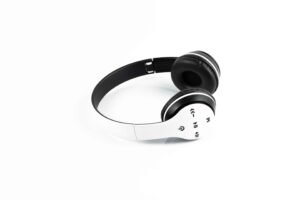
People tend to adhere to the decision based on their initial judgment. They find it challenging to change the primary decision in the later stages. This way, nothing is stronger than the first impression, as it helps you gain the customer’s trust in the first place.
When preparing the main image, maintain the Amazon product image requirements above to make it a perfect fit for this platform.
Use All the Image Slots Wisely for the Best Presentation
Amazon allows you to use up to nine slots for the product presentation. While the main image attracts the customer in the first impression, others aim to retain your customers’ attention with more details and convince them to purchase.

Now, Amazon allows one video to be uploaded for each product and dedicates the seventh slot for the video.
Video can present a product more engagingly, increasing the conversion rate. So, don’t forget to utilize this opportunity.
Moreover, maintain a proper strategy when preparing a series of product images for an Amazon listing. For example, when the first image only shows the front side of the product on a pure-white background, others must showcase the rest of the details with different kinds of images as needed.
Put Your Efforts into Relevant Lifestyle Images
Lifestyle images show the products in action. In other words, these images aim to show your products being utilized by people in real life.

It represents your audience’s situation, proving that you care about their pain point. Thus, lifestyle images can communicate directly about the necessity of your products, arousing interest and emotions.
Let’s say you sell premium kitchen products on Amazon. In that case, using a premium kitchen in the background of the product image can be more persuasive, as it will match your audience’s perspective.
The more communicative your content is, the more engagement and trust you can gain; that goes without saying.
Try Infographics for the Detailing
It is easier to communicate through visual presentation compared to text as a medium. Studies show that humans can communicate with infographics 60,000 times faster than text. So, use infographics as your secondary or additional images, as you won’t have enough time to persuade your audience.

You can use infographics for various reasons, such as describing product size, highlighting unique features, or presenting a visual story.
Describe Product Features with Zoomed-in Images
Your prospects won’t be able to touch your products on the Amazon marketplace. So, showcasing your products in the best possible way is important. Zoomed-in photos can be the savior here, which has no conflict with Amazon product image requirements.

With zoomed-in images, you help your customers understand each detail with closer looks, allowing them to verify the quality and adjustability of your products.
Let’s say you sell mobile phones on Amazon. In that case, your customers may want a closer picture of the charging ports, volume and lock buttons, etc. If you don’t have the zoomed-in images in the Amazon list, you might fall behind compared to those having it.
Include Before-and-After Images to Express the Product Value
If your products solve a specific problem for your customers, show exactly how they can benefit your customers. Presenting the comparison between before and after using your product can help them understand the value of your product more clearly.
Suppose you sell organic cosmetics that reduce acne problems. In that case, compare before and after using your products side-by-side. It is a proof or case study that makes your customers aware of the problems.

Talking about your product’s benefits is important; visualizing them through comparisons plays a more powerful role.
Include User Manual Images to Instruct
People can easily get confused about the usability when bringing a unique product to the marketplace. In that case, dedicate one image to showing your potential customers how to use your product.
In other cases, when your products need installation or assembly, describing the process is also important, with a user manual image.

Suppose you sell skin care products online. In this case, show a model applying the product on her skin so that your audience can understand the functionality.
Include a 360-image
If possible, use a slot for the 360-degree image that gives your customers full control over the viewability. Though it requires professional hands to shoot 360 photos, it is worth investing in.
Customers want to see the products from different angles. You won’t always be able to fulfill their demand within the limited slots. 360-degree images can save you here.
It will cover you up if any important angles have been missed beyond your concern.
Optimize for Mobile
On the Amazon marketplace, 56.41% of the traffic comes from mobile devices. So, mobile optimization should be your major concern here.
That is, not optimizing for mobile phones will cause you to lose most of the traffic.
When preparing your product photos, double-check if the format is easily viewable and meets the UX/UI best practices.
Hire Professionals for the Best Adjustment and Conversions
The era of DIY service at Amazon is gone because of the rapid increase in competition. To stay ahead of the competition, your product image needs to be well-polished and fine-tuned, which meets the Amazon product image requirements.
No one wants to take the risk with their conversion rate, while a professional touch on the Amazon product image can ensure it.
That’s where the ecommerce product image editing service comes in.
So, hire professionals to push the conversion rate beyond your ability and ensure your e-commerce success.
FAQs
Are Amazon product images copyright-free?
No, Amazon product images are not copyright-free. Rather, they are copyrighted by the uploaders or the manufacturers.
Can I use Amazon images on YouTube?
To use Amazon images on YouTube, you must be a part of the Amazon Associates program, following their terms and conditions.
Can I use Amazon product images on my affiliate website?
Yes, you can use Amazon product images on your affiliate website as long as you are an Amazon associate.
What is the recommended image size for Amazon product photos?
The recommended size is at least 1000px on the longest side, but ideally 2000px or larger for zoom functionality. Images should be high-quality, clear, and in a 1:1 square aspect ratio for best display.
How many images should I upload for an Amazon listing?
Amazon allows up to 7 images per listing, and you should use all of them if possible. At minimum, upload 6–7 high-quality images to show different angles, features, and real-life usage to improve conversions.