

Digital communications depend heavily on images because they serve as fundamental components for branding campaigns and layout construction. Image quality stands as a significant determinant which directs user success because exceptional visuals create both product attraction and artistic storytelling. Image editing software depends on clipping paths as indispensable tools that grant users complete control of image contents. This guide explains the benefits of clipping paths to develop your understanding alongside UK Clipping Path as your superior source for flawless image editing services. In this content we discuss about the importance of clipping path in image editing.
What Is a Clipping Path?
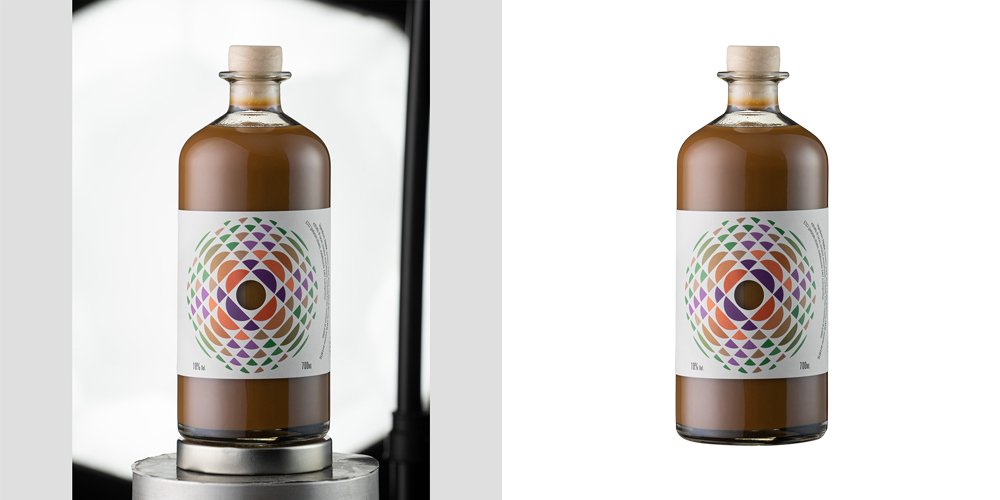
The vector based outline of a clipping path functions as a boundary tool to split image subjects from their surrounding elements or picture background. Graphic design software including Adobe Photoshop generates clipping paths that let editors insert targeted image alterations with advanced precision. A subject-area path definition allows image editors to extract backgrounds while improving details and transform visuals for multiple uses without affecting overall content.
The core features which define a clipping path include vector-based programming and the capability to control edges with true precision.
- Vector-Based: Vectors create clipping paths which retain high image quality when the path needs to be resized.
- Precision: Users obtain precise boundary control for their subjects to achieve superior professional results.
- Flexibility: Users can modify and adjust the path prototypes for image updates with simple ease.
Types of Clipping Paths
Clipping paths exist in two forms depending on both complexity level and creation tool design features. Selecting the right image editing process becomes simpler by recognizing the different clipping path types.
Vector Clipping Paths
People generate vector clipping paths through their work in vector-based software applications such as Adobe Illustrator and Photoshop’s Pen tool. Visual content requiring smooth junctions and simple backgrounds advantages from this type of path.
- Pros: High precision, scalable without loss of quality, editable paths.
- Cons: Creating vector paths for complex images demands both long duration work sessions and skillful use of vector tools.
Raster Clipping Paths
Raster clipping paths perform as pixel-based clipping tools specifically designed to work with detailed or feathered images such as animal hair and fur. The process of generating raster clipping paths requires masking and selection tools for implementation.
- Pros: Suitable for complex images, handles soft edges well.
- Cons: Vector transformation becomes challenging when you resize raster images because they lose resolution at the same time.
Bezier Clipping Paths
The Bezier clipping paths depend on Bezier curve technology to generate their smooth adaptable paths. These paths work particularly well with curved subjects and shapes of all kinds of complexity.
- Pros: The paths give you smooth motion which works perfectly for creating curved edges.
- Cons: Operational control of Bezier curves demands extensive skill for appropriate manipulation.
Freehand Clipping Paths
Using Freehand Pen or Brush tools users need to hand-draw through their subject to create clipping paths. Using this method produces excellent outcomes for complex forms that do not respond to automatic systems.
- Pros: Highly customizable, ideal for complex shapes.
- Cons: Labor-intensive, less precise than vector or Bezier paths.
The Importance of Clipping Path in Image Editing
Various aspects of image editing heavily rely on clipping paths that deliver multiple benefits leading to improved image quality and usability. Here’s why Clipping paths are crucial:
Enhancing Visual Appeal
The proper execution of clipping paths allows your images to centralize their subjects above backgrounds for improved attractiveness. This degree of separation enables users to enhance image aesthetics through background replacements together with color manipulations and additional visual improvements.
Improving Product Presentation

Product images control every aspect of success within ecommerce markets. Through clipping paths retailers can display their products before clean static backgrounds which adds professional gloss while attracting potential buyers.
Facilitating Professionalism
Precise clipping paths which arrive through high-quality image editing represent professional expertise. Clipping-path edited images used in marketing materials and portfolios and online catalogs prove both a thorough focus on detail and a dedication to deliver superior quality.
Streamlining Design Processes
The design process becomes simpler through clipping paths because they let designers seamlessly move images into different layout structures whenever needed. Embracing flexible operations both speeds up production work and enables designers to explore more options creatively.
Step-by-Step Guide to Creating a Clipping Path
The process of creating clipping paths demands both the mastery of technical techniques together with the capability to evaluate an image artistically. Here you have a complete step-by-step process to design accurate clipping paths using the widely used imaging tool Adobe Photoshop.
Step 1: Choosing the Right Software
A tool for creating clipping paths must operate with vector software which allows path generation. The most common tool for creating clipping paths is Adobe Photoshop although Adobe Illustrator and CorelDRAW can function similarly for this purpose.
Recommended Software:
- Adobe Photoshop: Adobe Photoshop provides users with advanced capability to design and refine clipping path tools.
- Adobe Illustrator: Ideal for more complex vector-based paths.
- CorelDRAW: This vector graphic editor meets the requirements needed to produce clip paths effectively.
Step 2: Importing the Image
Your editing process starts by importing the image you want to change into your selected software program.
In Adobe Photoshop:
Open Photoshop:
Access the File menu then choose Open to select the desired image.
The selected image now displays on the canvas before any editing process starts.
Step 3: Selecting the Pen Tool
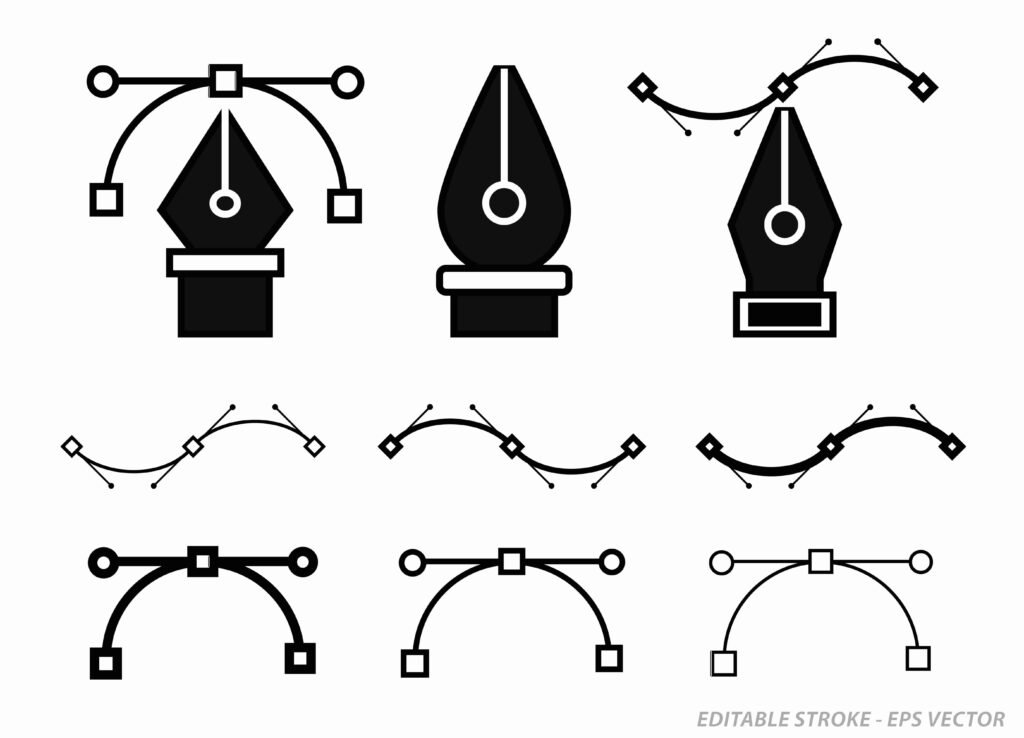
To create exact clipping paths the Pen tool stands as both essential and core. By positioning anchor points you can use this tool to sketch paths which produce Bezier curves.
Accessing the Pen Tool:
- Select the Pen tool from the toolbar on the left (shortcut: P).
- Set your Pen tool options to display “Path” mode because “Shape” mode should be avoided.
Step 4: Tracing the Object
Initiate an overview of the subject matter by setting anchor points which encircle its outer edges. To create straight edges click the Pen Tool point placement points. To make curved edges smooth you should hold the mouse button while dragging.
Tips for Tracing:
- Start at a Logical Point: Trace your first point in a position from which you can reach all parts of the object easily.
- Use Fewer Points: Create your paths with few points by designing smooth lines to achieve efficient results.
- Zoom In: Better accuracy results when users zoom into their work.
Step 5: Refining the Path
The shaping of the path starts after object outlining to achieve both accuracy and smoothness.
Refinement Techniques:
- Adjust Anchor Points: Anchors should be positioned where they align with the object’s outline.
- Adjust Handles: Adjust the Bezier handles to obtain the ideal edition of curves.
- Add or Remove Points: Complex regions need additional point insertion while paths benefit from unnecessary point removal for improved natural shapes.
Step 6: Closing the Path
Round off path creation by uniting the final anchor point with the starting anchor point. A properly functioning clipping mask requires a path to remain closed.
Closing the Path:
- Click to close the path.
You will notice the cursor turns into a circle when your pointer rests on top of the starting point.
Step 7: Applying the Clipping Path
After refining your path you can implement it to generate your clipping mask.
In Adobe Photoshop:
- Select the Paths panel by clicking Window > Paths.
- Proofread your Documents to verify selection of clipping paths.
- You can make a clipping mask by right-clicking a path and selecting Make Selection from the popup menu.
- You can now select, modify and erase the background when the selection feature is activated.
Step 8: Saving and Exporting
Save a clipping path creation by exporting work to formats which maintain path information for modifications over time.
Saving the File:
- Photoshop (PSD): Retains layers and path information.
- TIFF: Supports layers and high-quality images.
- EPS: You should choose vector-based paths when you require path functionality within other vector programs.
Exporting for Use:
- PNG: For images with transparent backgrounds.
- JPEG: You can use PNG images when needing transparency in web layouts. Also suitable for simple clean background scenes in JPEG format.
Applications of Clipping Paths Across Industries
Clipping paths function as versatile workforce tools throughout different industrial fields to boost image quality while improving functionality.
Below are some key applications:
Ecommerce
The successful performance of ecommerce depends primarily on excellent product images that help drive sales. Crop paths serve as tools which present products in front of consistent painted backgrounds for improved visual appeal as well as professional execution.
Benefits:
- Consistent presentation across product catalogs.
- The product visual focus becomes stronger when all distracting elements disappear.
- Products maintain seamless integration with website themes and various layout configurations.
Photography
Through subject isolation with clipping paths photographers achieve creative possibilities such as background transformations along with color modifications and composite image combines.
Benefits:
- Greater creative control over final images.
- Modern photography tools enable professionals to produce photographs suitable for portfolios.
- Simplified workflow for complex image manipulations.
Graphic Design
By utilizing clipping paths graphic designers can develop unified designs which incorporate diverse image components for logos and brochures and advertisements and digital presentations.
Benefits:
- Precise integration of images into design projects.
- Clipping paths provide designers the capacity to edit individual composition parts without breaking the complete design structure.
- Enhanced visual consistency and professionalism in designs.
Advertising and Marketing

Reliable image quality stands as an essential requirement for developing effective advertising and marketing strategies. Visual messaging and audience capture become achievable through the help provided by clipping paths.
Benefits:
- Creation of eye-catching advertisements with clear focal points.
- Ablelamages can be made image specific to match brand visual identity elements.
- Improved effectiveness of visual marketing materials.
Publishing
The preparation of images for electronic and printed media requires clipping paths from publishers to achieve both publication standards and visual content partnership.
Benefits:
- The publishing industry utilizes high-quality presentations for images that appear in magazines, books and across online platforms.
- Efficient preparation of images for various formats and layouts.
- Visual story development becomes more effective by applying exact edits to images.
Why Outsource Clipping Path Services?
Professional clipping path development can be completed within the organization yet businesses best consider external outsourcing when working with large operations or needing advanced expertise.
Cost-Effectiveness
Businesses gain cost efficiency by outsourcing clipping path tasks since they avoid permanent team employment along with related expenses such as software and training costs and employee salaries.
Advantages:
- Lower operational costs.
- Your budget covers only those services you use.
- Professional service providers offer access to qualified talent beyond geographical boundaries between businesses worldwide.
Time Efficiency
Companies can center their core operations when specialists manage the lengthy work involved in image editing through outsourcing.
Advantages:
- Faster turnaround times.
- Ability to meet tight deadlines.
- Your business gets better productivity through allocating core responsibilities outside of your regular tasks to outside providers.
Access to Expertise
When you work with clipping path professionals they possess expert editors who combine years of experience with practical skill and understand best practices that lead to superior results.
Advantages:
- The resulting work shows both high-level accuracy and meticulous attention to precise details.
- Your workforce has the capability to execute demanding complex image editing projects.
- Up-to-date with the latest tools and techniques.
Scalability
Companies find scalability through their outsourcing partnerships since they can adjust service levels in response to changing project needs while avoiding staff recruitment or termination processes.
Advantages:
- Through organization clients can handle big projects efficiently throughout high-demand periods.
- The provider offers adjustable service capacity based on emerging business requirements.
- Project size affects nothing when you maintain a constant level of service delivery.
Why choose UK Clipping Path for the clipping Path service
UK Clipping Path is a trusted choice for businesses looking for high-quality and reliable clipping path solutions. With years of experience in image editing, we focus on delivering precise, clean, and professional results that meet global standards.
Our team of skilled editors handles every project with care, ensuring accurate cutouts and consistent quality across all images. We combine industry expertise with modern editing tools to produce results that enhance product presentation and brand value.
What sets UK Clipping Path apart is our commitment to quality, timely delivery, and client satisfaction. Whether it’s a small batch or large-scale project, we provide flexible solutions tailored to your needs.
In short, UK Clipping Path offers a global standards clipping path service that helps businesses present their visuals with confidence and impact.
Conclusion
The image editing tool known as the clipping path constitutes an essential foundation which enables ultimate precise control of visual content design. Clipping paths support professional and attractive results for product images in online stores while also enabling portfolio retouching and design inclusion.
UK Clipping Path functions as your trustworthy editing companion to deliver premium visual optimization services for your projects. Our expert team utilizes state-of-the-art tools and remains deeply dedicated to quality to help you convert your visuals into strategic market assets.
Making an investment in professional clipping path services creates both improved aesthetics for your images and stronger marketing strategies and more effective branding solutions and design projects. The power of clipping paths stands refined through UKClippingPath.com to provide elevated visual content that reaches extraordinary excellence.
Frequently Asked Questions (FAQs)
Why do clipping paths differ from image masking techniques?
A clipping path consists of vector-based outlines which separate subjects from backgrounds but image masking requires the creation of a masking system specifically designed for subjects with complex edges.
When working with clipping paths to edit an image, what length of time should people expect?
Businesses need more time for image editing depending on their subject matter complexity and current workload concentration. Simple image editing jobs complete in 24 hours or less even though mission-critical modifications may demand additional duration. UK Clipping Path allows clients to use our fast delivery solutions to satisfy pressing deadline commitments.
Our team handles editorial tasks within images that include various items and elements.
Our professional multi-clipping path service processes multiple object images to achieve optimized element precision for editing functions.
Our company accepts which types of file extensions?
We process various file types such as JPEG along with PNG and TIFF and PSD and AI files and other formats. Let our team know when you need a file type outside our regular service options.
Can UK Clipping Path guarantee the protection of your data through secure infrastructure?
Absolutely. We have deployed extensive security protocols both to safeguard your data and defend your confidentiality. Your images receive complete protection and never leave company control for sharing with outside organizations.
Will you perform revision work when I am not content with the editing changes?
We provide revisions until you reach full satisfaction with our editing work. To request changes speak with our support staff who will implement the required modifications.
Can you handle bulk orders?
We maintain the capacity to process bulk order demands with speed and efficiency. We handle extensive projects prone to large data volumes by maintaining strict quality standards.
What features distinguish UKClippingPath.com from existing image editing service providers?
Our leading position in the image editing industry stems from our dedication to quality alongside fast services and professional staff and exceptional customer care. Our team continuously works to deliver results which surpass all client expectations in each new project.